## 1.What Is AI Video Style Transfer?
AI video style transfer is a way to transform the look of a real video into a new visual style, such as anime, while keeping the original motion, timing, and scene structure. That is why it is much more useful than a simple filter. Good tools do not just change one frame — they try to preserve continuity across the whole clip. Public product pages from tools like Luma describe this as preserving motion, timing, and scene continuity, which is also exactly the kind of result users want when searching for “real video to anime.”
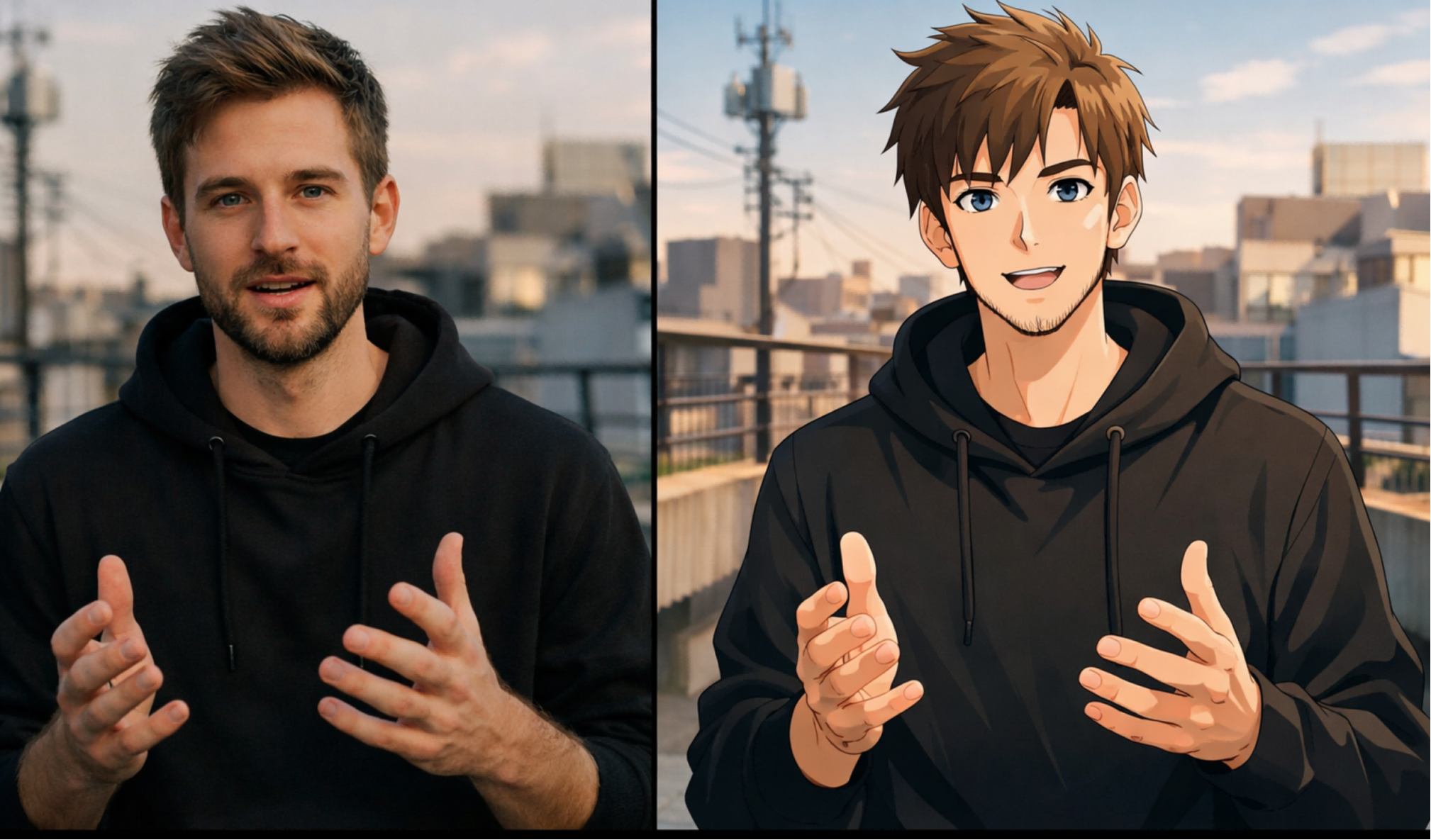
## 2.Why Turn a Real Video into Anime with AI?
Anime-style video stands out on TikTok, Reels, Shorts, and branded social content because it gives familiar footage a more stylized, high-attention look. LensGo’s public positioning for video style transfer explicitly highlights anime and other artistic styles as popular formats for scroll-stopping short-form content. For creators and marketers, this makes AI video style transfer attractive because you can repurpose existing live-action footage instead of building animated scenes from scratch.
<div data-youtube-video="">
<iframe class="rounded-lg my-4" width="640" height="360" allowfullscreen="true" autoplay="false" disablekbcontrols="false" enableiframeapi="false" endtime="0" ivloadpolicy="0" loop="false" modestbranding="false" origin="" playlist="" rel="1" src="https://www.youtube-nocookie.com/embed/AbXPQ18U3P0" start="0"></iframe>
</div>
## 3.How to Turn a Real Video into Anime with VideoSwap
If you want a practical workflow, VideoSwap’s **Video Style Transfer** page gives you a strong structure to build this blog around. The flow is simple: upload a real video, choose how you want to define the style, and generate the anime-styled output. VideoSwap supports three useful ways to control the result: **preset styles**, **reference images**, and **text prompts**. It also emphasizes preserving the original motion rhythm and timing of the clip, which is one of the main reasons this workflow feels more polished than basic one-click filters.
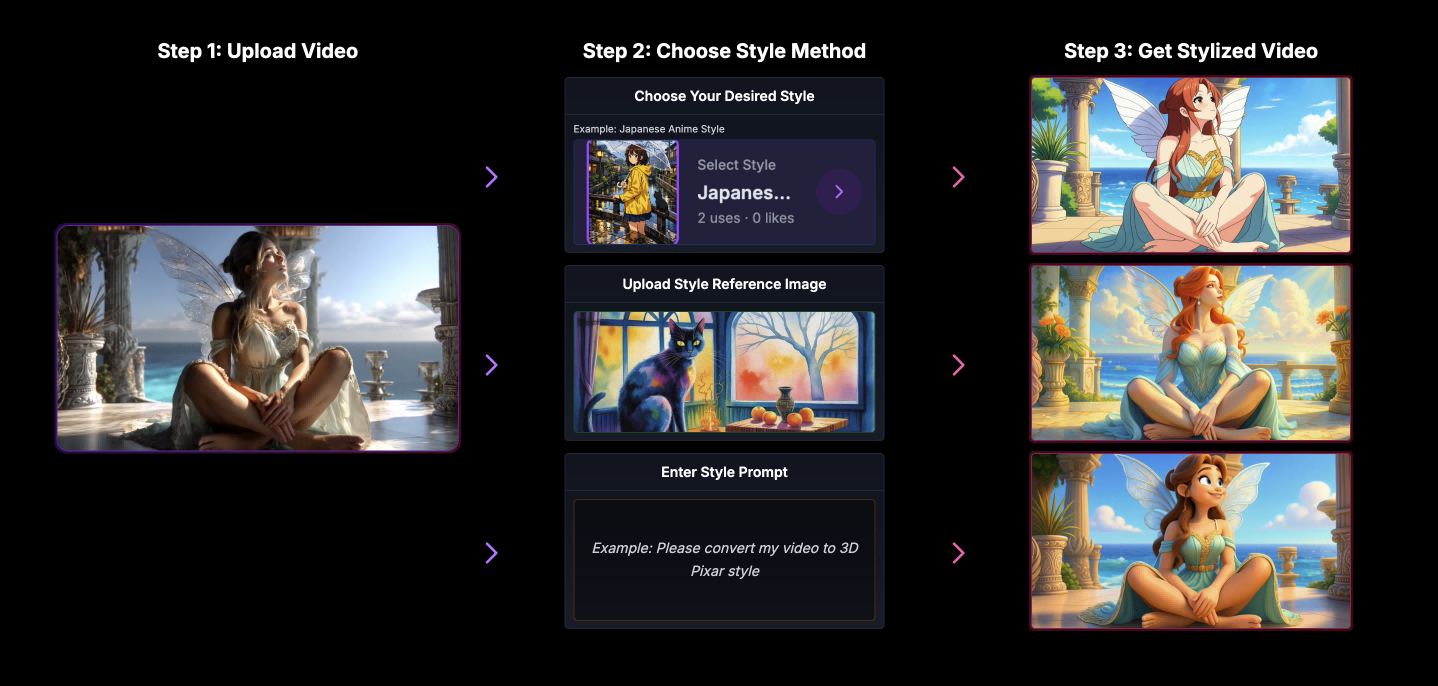
## 4.Best Tips for Better Anime Video Results
To make the anime videos generated by AI more stable, the quality of the source material is crucial. Clear subjects, good lighting, stable shots, and moderate movement are more likely to yield better results. Short videos, clear subjects, appropriate lighting, and not too fast movement generally favor style transfer outputs. In other words, to achieve better results, start with a short, stable, and clean live-action clip.
## 5.How to Write Better Prompts for Anime Style Transfer
If you only write "make this anime," the result is often quite vague. A better approach is to specify the style, such as lines, shading, colors, atmosphere, and camera angles. You could write:
“urn this live-action clip into polished Japanese anime style, clean line art, soft cel shading, vivid but balanced colors, cinematic evening lighting, detailed urban background, smooth frame-to-frame consistency.”
The benefit of doing this is that the model will have a clearer understanding of the specific anime style you want, rather than just applying a random cartoon effect.
## 6.Why VideoSwap Is a Good Fit for This Workflow
It’s not just about “adding filters to videos”; it emphasizes preserving the original rhythm of movements and supports three input methods: preset, reference image, and text prompt. Additionally, it can retain the original audio, which is very practical for Shorts, Reels, spoken videos, and creator content. For those who want to quickly transform live-action footage into anime style without getting involved in complex post-production processes, this online workflow is easy to translate into practical use.
Link: [Anime Style Transfer](https://www.videoswap.app/video-style-transfer)
How to Turn a Real Video into Anime with AI
March 14, 2026
Learn how to turn a real video into anime with AI using video style transfer. Discover prompts, workflow tips, and VideoSwap for smooth, consistent results.
video style transfer
Related Posts
Public
Mar 13, 2026
AI Video Style Transfer Guide: How to Stylize Footage with Video-to-Video AI
Learn AI video style transfer with Video Swap. Turn clips into anime, cinematic, or custom looks while preserving motion, timing, and detail.
Public
Mar 15, 2026
Character Swap vs Motion Control vs Style Transfer: Which AI Video Tool Do You Need?
Compare AI character swap, motion control, and video style transfer to find the right AI video tool for ads, creators, animation, and branded content. Learn what each tool does, when to use it, and how VideoSwap helps you create consistent, high-quality AI videos faster.
Public
Mar 14, 2026
Best Prompts for AI Video Style Transfer
Discover the best prompts for AI video style transfer. Learn how to write anime, cinematic, and cartoon prompts in VideoSwap for smooth, consistent video results.